Use GPT
  • Home
  • Contact

Latest Video


Popular Posts

  • A Guide to Powerful Prompt Engineering. Mastering LLM Prompting

    March 20, 2025
  • Streamlined LLM Data Pipelines by Extracting & Serializing Text from Documents Of Various Formats

    May 31, 2024
  • 3

    Bring Large Language Models to Your Desktop (in 4 easy steps)

    May 5, 2024
@2024 - All Right Reserved - usegpt.in
Top Posts
A Guide to Powerful Prompt Engineering. Mastering LLM...
How Masked Self-Attention Empowers Large Language Models?
Guide To Building AI Agents with Llama 3.3...
Mastering ChatGPT with useGPT: Top 10 Trending Prompts...
Strawberry: A Deep Dive into OpenAI’s Next-Gen AI...
Streamlined LLM Data Pipelines by Extracting & Serializing...
Differences between Meta’s 3 8B-Instruct vs 8B model
Bring Large Language Models to Your Desktop (in...
Vlogger – Breathing Life Into Static Images through...
Top 5 Firefox Plugins to Power Up Your...

Google Doodle: Holi – The festival of colors

by teamgpt March 10, 2001
written by teamgpt

holi

Holi, or Holli, also called the Festival of Colors, is a spring festival celebrated by Hindus, Buddhists, Sikhs, Jains and others. It is primarily observed in India, Nepal, Srilanka, Pakistan, Bangladesh, and countries with large Indic diaspora populations, such as Suriname, Guyana, South Africa, Trinidad, UK, USA, Mauritius, and Fiji. In West Bengal of India and Bangladesh it is known as Dolyatra (Doul Jatra) or Basanta-Utsav (“spring festival”). The most celebrated Holi is that of the Braj region, in locations connected to the god Krishna: Mathura, Vrindavan, Nandagaon, and Barsana. These places have become tourist destinations during the festive season of Holi, which lasts here to up to sixteen days..

March 10, 2001 0 comment
0 FacebookTwitterPinterestEmail

iPad Parody Funny Pictures

by teamgpt February 10, 2001
written by teamgpt

iPad is undoubtedly the most controversial product that Apple has produced in recent years. Firstly, the name – iPad itself created hell lot of controversies and a later comes the design of the new Apple product – The iPad…

If you’re interested in knowing the features of iPad, view our previous post from the archives.

Here is a list of funny iPad Pictures from around the web.

ipad parody pics funny

ipad parody pics funny

ipad parody pics funny

ipad parody pics funny

ipad parody pics funny

ipad parody pics funny

ipad parody pics funny

ipad parody pics funny

ipad parody pics funny
[Credit – melekalikimaka]

These are some of the funnies images about iPad that i found around the web… do you have more? share them below :) LOL

February 10, 2001 3 comments
0 FacebookTwitterPinterestEmail

Acer Driver problems with Windows 7

by teamgpt February 10, 2001
written by teamgpt

acer
Yesterday, I bought a new Acer Aspire notebook and installed Windows 7. The problem with “Acer + Windows 7” is that, the drivers (for windows 7 ultimate) are not installed and available with the CD packed with the laptop.

So, this post is dedicated to all the people suffering with Acer Driver problems. Acer has a dedicated support page from which we can download all the drivers for the laptop. I’ve listed the some important drivers required to run windows smoothly on the new laptop.

Couple of things to start with…

–          Install the windows operating system of your choice on the laptop (if windows OS is packed with the laptop even better, coz you won’t be facing any of these driver issues)….

–          Visit the Acer support site –> Select your laptop model

–          After selecting the model of your laptop, choose carefully the operating system (Windows XP or Windows Vista or Windows 7)

–          Download the drivers, install and you’re all setup.

If you’ve chosen the right drivers, then all your system hardware should be working fine and you’re good to go. Here are some drivers that you need to run a smooth system with windows 7 ultimate.

–          Wifi + Network drivers

–          Web cam drivers

–          Fingerprint reader drivers (about 100mb)

These are the basic drivers that you might need.  If this stuff is too geeky for you, you can probably call the Acer support on 1-800-11-6677…. Hope all this info helps!!!

p.s this is my first post from my new laptop :)

February 10, 2001 0 comment
0 FacebookTwitterPinterestEmail

Get Paid to Report Security Bugs in Chrome

by teamgpt February 10, 2001
written by teamgpt

chrome logo

Google has announced on its chrome developer blog, that it would be paying developers to report bugs in google chrome and firefox.

This is a new way of fixing and rewarding authors\developers at the same time.

Any bug filed through the Chromium bug tracker (under the template “Security Bug”) will qualify for consideration. As this is an experimental program there are some guidelines one needs to follow, in order to get paid :).

More information can be found on the Google Chrome Blog.

February 10, 2001 0 comment
0 FacebookTwitterPinterestEmail

Google drops support for IE6 – RIP

by teamgpt February 10, 2001
written by teamgpt

Google has given its verdict! From March 1st, all google products will drop the support of IE6.. This could also because of the Google – China attack (we’re guessing) – It seems that the Chinese hackers infiltrated the Google accounts using the IE6 vulnerability.

The company has recommended that users upgrade immediately to other browsers Microsoft Internet Explorer 7 +, Mozilla Firefox 3.0 +, Google Chrome 4.0 + or Safari 3.0, an update that would be required because of insecurity manifests itself in IE6 and lack of standards support concerned with web developers.

According to Google, “the Web has advanced enormously in the last ten years from simple text pages to interactive applications that unfortunately older browsers cannot run effectively.

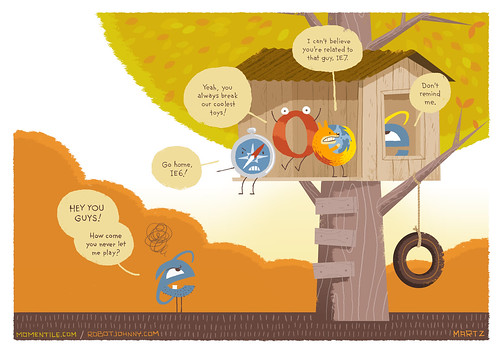
Here is a funny IE6 Parody image :)…
IE 6 parody

Thus Google is added to the initiative taken by other companies, banish old browser versions. The company has opted for Google Docs and Google Sites are not supported in IE6 and another in the other, from long-standing standard browser, movement that will become effective on 1 March 2010.

February 10, 2001 0 comment
0 FacebookTwitterPinterestEmail

How To Get OnePlus 3 \ 3T Android Nougat Update Early In India

by teamgpt January 17, 2001
written by teamgpt

OnePlus3 \ 3T are getting the Android Nougat Update and its almost here for All! According the co-founder’s tweet, the updates are gradually rolling out.

https://twitter.com/getpeid/status/815171834345885696


The Android N Stable OTA for OP3 and OP3T users are gradually rolling out starting 31st December 2016. But the update isn’t still showing for everyone and is gradually rolling out by regions (Canada, Germany) and so on..


For Geeks who do not wish to wait for the gradual roll-out, can get their hands on the latest update with a simple workaround. Thanks for posting the trick in the oneplus forums.


Here’s how to get the latest update for India, other regions who are still waiting for the OnePlus3 Android Nougat Update.


  1. Visit the Play-store and download OPERA VPN app from Play-store.
  2. Open Opera Vpn app and it will automatically ask you to change location.
  3. Now change the location to Canada or Germany..
  4. Once location is changed ..you will see a “key” symbol in the status bar, beside the battery level.
  5. Now close the Opera VPN app… Go to phone setting and check for update.
  6. You will definitely receive an Android N update of 1GB…BUT do not download it yet.
  7. Open Opera VPN once again, change your location to India..
  8. Disable the app or just switch your phone back to normal network
  9. You are good to go..Open the settings and hit the Download the update button.
That’s it. It would take some time for the file to get downloaded based on the internet speed. After that is done, it Restart and Install button. The system installer will take care of the rest.
January 17, 2001 0 comment
0 FacebookTwitterPinterestEmail

Display of fireworks hidden behind the I’m feeling lucky button – Easter Egg

by teamgpt January 10, 2001
written by teamgpt

About a week ago we told you that there was a hidden message – countdown in the ‘I’m feeling lucky button’ on the home page of Google.com which was set to trigger exactly on the new year at 00.00 hours. Now that we’re in the New Year, when I tried to click on the “I’m feeling lucky button”, it just splashed the happy New Year message with a grand display of fireworks across the Google homepage!

This is the first time a Google Easter Egg is placed in the Google.com homepage!

Thanks Websonic for the video :)!!

Happy new year to you too…. Have a blast!!

January 10, 2001 1 comment
0 FacebookTwitterPinterestEmail

Google’s New RealTime Homepage

by teamgpt
written by teamgpt

After Google launched its new real-time search, one thing the interface missed was the style. The real-time results from twitter & Facebook were in the middle of the search results and looked ugly. Now the Google team has come up with a new-nicer look for the real-time searches.

You can hit – http://www.google.com/realtime/ to start searching in real-time. This new interface is almost the same as the Google.com interface.

Here is how the real-time homepage looks like:

And the results page:

The results keep updating themselves as and when there is new information available, just like the twitter stream!!

Still confused? Yeah! Google thought so too… they’ve made a video, check it out!

0 comment
0 FacebookTwitterPinterestEmail
  • 1
  • …
  • 86
  • 87
  • 88
  • 89
  • 90

About Me

Sr Developer

My name is Sharath, I'm a developer at heart ❤️ based in namma Bengaluru, India. Welcome to my internet journal where I discuss about Artificial Intelligence, Machine Learning, GPTs, Development and much more.

Keep in touch

Facebook Twitter

Resources

  • A Guide to Powerful Prompt Engineering. Mastering LLM Prompting

    March 20, 2025
  • How Masked Self-Attention Empowers Large Language Models?

    January 1, 2025
  • Guide To Building AI Agents with Llama 3.3 and Phi Data

    December 19, 2024

Recent Posts

  • A Guide to Powerful Prompt Engineering. Mastering LLM Prompting

    March 20, 2025
  • How Masked Self-Attention Empowers Large Language Models?

    January 1, 2025
  • Guide To Building AI Agents with Llama 3.3 and Phi Data

    December 19, 2024
  • Mastering ChatGPT with useGPT: Top 10 Trending Prompts For Everyday Tasks

    December 1, 2024
  • Strawberry: A Deep Dive into OpenAI’s Next-Gen AI Model

    September 11, 2024

Categories

  • Coding (12)
    • Backend (2)
    • Frontend (2)
    • Guide (2)
    • Machine Learning (8)
  • Data Science (5)
  • Guide (3)
  • News (37)
  • Resources (2)
  • SEO (1)

Backend

  • What does numpy seed function do?

    February 22, 2024
  • Getting Started with Backend Development 101

    January 25, 2024

Frontend

  • A Guide to Powerful Prompt Engineering. Mastering LLM Prompting

    March 20, 2025
  • How Masked Self-Attention Empowers Large Language Models?

    January 1, 2025
  • Guide To Building AI Agents with Llama 3.3 and Phi Data

    December 19, 2024
  • Mastering ChatGPT with useGPT: Top 10 Trending Prompts For Everyday Tasks

    December 1, 2024

Guide

  • Mastering ChatGPT with useGPT: Top 10 Trending Prompts For Everyday Tasks

    December 1, 2024
  • How To Nail Your Programming Interview

    January 25, 2024
  • Facebook
  • Twitter
  • Linkedin
  • Youtube
  • Email
  • Github
  • Stack-overflow

@2024 - All Right Reserved - usegpt.in