Use GPT
  • Home
  • Contact

Latest Video


Popular Posts

  • A Guide to Powerful Prompt Engineering. Mastering LLM Prompting

    March 20, 2025
  • Streamlined LLM Data Pipelines by Extracting & Serializing Text from Documents Of Various Formats

    May 31, 2024
  • 3

    Bring Large Language Models to Your Desktop (in 4 easy steps)

    May 5, 2024
@2024 - All Right Reserved - usegpt.in
Top Posts
A Guide to Powerful Prompt Engineering. Mastering LLM...
How Masked Self-Attention Empowers Large Language Models?
Guide To Building AI Agents with Llama 3.3...
Mastering ChatGPT with useGPT: Top 10 Trending Prompts...
Strawberry: A Deep Dive into OpenAI’s Next-Gen AI...
Streamlined LLM Data Pipelines by Extracting & Serializing...
Differences between Meta’s 3 8B-Instruct vs 8B model
Bring Large Language Models to Your Desktop (in...
Vlogger – Breathing Life Into Static Images through...
Top 5 Firefox Plugins to Power Up Your...

standalone google contacts for all users

by teamgpt March 9, 2021
written by teamgpt
Google contacts

Google today announced its Gmail Contacts as a published application. You can find this at google.com/contacts…

google contact beta page

.If you’re a Gmail user, all your contacts from Gmail would be displayed in the Google Contacts. Google Contacts corresponds with some differences in the optical Contacts view in Gmail. In addition to import, export and print are the same groups, a search and the recent contacts list.

Even users who do not have Gmail account, but only a Google account can now use the Google Contacts and there is no restrictions in the functions.

PS: And finally, the big surprise: Google Contacts is another beta product from Google ;) ….. .

March 9, 2021 0 comment
0 FacebookTwitterPinterestEmail

Add Facebook in Gmail instead of Google Buzz

by teamgpt February 10, 2021
written by teamgpt

If You’re like me and have deactivated Buzz in Gmail but still feeling uneasy about the idea of being able to communicate with your friends from your mailbox Gmail, here is a solution.

A person called David Mulder has developed an Chrome extension which allows you to add Facebook to your Gmail navigation with an interface very similar to Google Buzz.

From the screenshots above, once you install this add-in Gmail adds a new submenu called Facebook, from which you can access the info from social networks and see what people are posting on FB. You can also update your facebook status directly from Gmail.

There is also a Greasemonkey script for Firefox to add Facebook to Gmail, once you install it the facebook tab starts showing right below Google Buzz.

February 10, 2021 0 comment
0 FacebookTwitterPinterestEmail

All Google Doodle’s of 2009 in a Slideshow!

by teamgpt February 10, 2021
written by teamgpt

Here is an awesome display of all Google doodle’s in a slideshow. This slideshow displays all the Logo’s that made to the Google Homepage.

Google Doodles for the year 2009

Visit out Google Doodle section to view more :)…

February 10, 2021 0 comment
0 FacebookTwitterPinterestEmail

Download videos from Youtube in just 3 clicks

by teamgpt January 10, 2021
written by teamgpt

There are lot of websites out there offering you help to download videos from Youtube. BUT this site is kinda special. The new site 3outube.com can help you download videos from Youtube in just 3 clicks. No hassle of copy pasting the youtube links.

Here is how to download Youtube videos in just 3 simple clicks:

1. While browising a Youtube video, if you want to download a video simply change only the letter “Y” from youtube.com to “3”, so the URL is 3outube.com.
step1 of youtube download

2. Remove and replace the URL
step2 of youtube download
changing the ‘Y’ to ‘3’

3. Now Click on the “Download” button.
Whola… that’s all :)

For example, if you want to download http://www.youtube.com/watch?v=OLKieLQ9QQU. Simply write http://www.3outube.com/watch?v=OLKieLQ9QQU and like magic, you’ll get a download link to the video in MPEG or FLV.

Isn’t that simple now? :)

January 10, 2021 1 comment
0 FacebookTwitterPinterestEmail

Wordpress 2.9 is available, what’s new?

by teamgpt December 9, 2020
written by teamgpt

After the release of WordPress 2.8.6, WordPress engineers started working on a newer version of WordPress and they had made up their mind that they would launch a newer version of WordPress within this year (2009)…. And they kept their words by launching it yesterday!! Congrats to the WordPress team :).

Let me discuss some import and new features in WordPress 2.9:

  • Trash em’, instead of Delete: Now there is an option to trash your recent drafts and comments. If you trash a draft\comment by mistake you can now undo the”trash” feature. This also gets rid of the annoying JS popup – “are you sure” messages we used to have on every delete.
  • Built-in image editor: Allows you to crop, edit, rotate, flip, and resize\scale your images. This is one of the much hyped features in this release of WordPress 2.9.
  • Nice buttons: In the dashboard the WordPress buttons have been smoothened and looks nice :) as of now, in the WordPress 2.9 release there aren’t any high end UI changes to the admin dashboard. This release mainly concentrates on some under the hood changes to the WordPress.
  • Under the hood changes:

–          Previously if we wanted to add a ‘rel=canonical’ to the WordPress blog, we had to use a plugin like All In One SEO, but now it’s been hard coded into the WordPress template for better SEO..

–          Automatic database optimization support is also one of the new main features. Remember that error “An error occurred, please try again” in WordPress? Yeah, that one. I hope we won’t be getting any of those since WordPress can automatically fix errors itself now.

Here is a video guide from WordPress team on the new WordPress 2.9 Carmen:
https://videopress.com/v/wp-content/plugins/video/flvplayer.swf?ver=1.11

The upgrades in 2.9 have been an exotic cycle, let’s wait and see what’s new in WordPress 3.0, which is coming soon (this spring). We can expect a lot more since the merge of MU with the WordPress core, and we hear that there is going to be a new default theme. Cheers to the WordPress team :)…

December 9, 2020 0 comment
0 FacebookTwitterPinterestEmail

Check if your Wordpress site is infected by Malware

by teamgpt November 9, 2020
written by teamgpt

There are many websites which host malwares (unknowingly) but they look like pretty nice and authentic sites in order to trap the visitors. Google Safe Browsing tool is a tool developed by Google which helps you to test a website which you think may not be authentic or has malware hidden in the source codes.

malware site
In order to check if your site has an suspicious code or malware then, you just need to type the following in your browser address bar –
http://www.google.com/safebrowsing/diagnostic?site=[website url].

For example we checked our site by going to http://www.google.com/safebrowsing/diagnostic?site=thesharath.com

Blogging is fun! BUT some hackers take advantage and try to hack sites. If you are a wordpress based blogger, then there is a plugin for WordPress that I recommend. It helps find potential viruses, javascript and iframe injections. The plugin is called WordPress Exploit Scanner.

Always upgrade to the latest version of wordpress, most security loop holes are fixed in the latest version of wordpress. And make sure you choose popular plugin rather than being a daredevil to test a new plugin you found on the internet.

First things first, Here is couple of things that you need to do if you think that your website is hit by malware.

  • Identifying malware on your site
  • When looking for badware\malware on your site, especially badware due to hacking attacks, please remember to check the source code of your site as it is currently hosted on your web servers.

  • Malware spread through ads running on your site
  • Always choose a good ads publisher to earn money. We believe in Google Adsense for our revenue, it easy to setup, fast and customizable and more than it’s entirely safe and doesn’t spread malware through ads scripts.

  • Links posted in user-generated areas of your site
  • Always moderate comments and remove clickable links posted in the comments of your articles.

Two common types of injection attacks:

  • Invisible iframes
  • <Iframe> tags are one of the many kinds of HTML tag codes that can be used as part of the source code that creates a website. An iframe creates a small window on a webpage so that another page can load inside the embedded window. Iframes are not always used for nefarious purposes; one frequent use, for example, is to embed remotely hosted dynamic content such as online maps into web pages. When used by malicious attackers, an iframe can be made so small that it is invisible, and the visitor to the infected page never knows that another page is also loading in the tiny iframe window.

    If you see code for an iframe with width=“0” and height=“0” in the source code of any page on your website, you have found an invisible iframe. Iframes are most commonly inserted at the very top or the very bottom of a web page’s source code. A good first place to check for iframes is before the initial tag that starts a web page’s standard code, or after the final that ends a page’s code.

  • Obfuscated code
  • Obfuscated code or scripts are designed to be hidden within the normal code for your site, so they can be hard to detect. The code is written specifically to prevent automated tools from discovering its purpose. The most commonly obfuscated kind of code is javascript, which is used to add functionality to many websites.

    Encrypted code is harder to find, because there are no set patterns. However, encrypted code will look like a block of unintelligible text. Normal javascript uses a syntax based on actual English words. Encoded or encrypted text appears in a site’s source code as completely unintelligible blocks of letters, numbers, and symbols.

    While most hacking attacks focus on html code, it is also possible for bad software itself to be uploaded onto a poorly secured site. Bad software can include unknown executables (such as files that end in .exe, .bat, .cmd, .scr, and .pif), javascript files, or even images uploaded to your site without your knowledge. Sometimes attackers will simply use your website to host badware and link to it from other victim sites. One method for detecting whether you are hosting bad software on your site is to download all of your source code from the live website onto a virtual machine and scan it using anti-virus and anti-spyware programs.

How do you remove malware?

  • Contact your web hosting
  • Remove the bad software from your website and don’t make it available for download again unless you can be sure that it is no longer badware. You can learn more about what makes a piece of software badware in our guidelines. If you are the creator of the software in question, StopBadware may be able to offer recommendations for bringing your software into compliance with our guidelines.

  • Don’t link to malware sites
  • Remove all malware links from your website.

  • If ads are showing malware content
  • Remove all ads that link to malware. If you use an ad network, this may mean removing all the network’s ads from your site until you can be sure the network is clean. You may also want to contact your ad provider and let them know that one or more of their ads is causing badware to be linked from your site.

How does your search engine result get impacted?

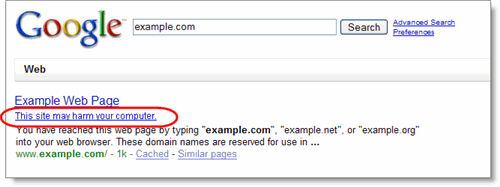
Google always wants its users to feel safe when they search the web, and they’re continuously working to identify dangerous sites and increase protection for our users. A warning message appears with search results we’ve identified as sites that may install malicious software on your computer:

google safe browsing

Google will not crawl\index and information from your site (which is bad for you). Hence no content from your site will show in the Google search results gradually.

For more information, visit http://www.stopbadware.org/. Also, Google maintains an Online security blog called Google online security blog, read it for more information.

November 9, 2020 3 comments
0 FacebookTwitterPinterestEmail

Google publishes source code of Google Chrome OS

by teamgpt November 9, 2020
written by teamgpt

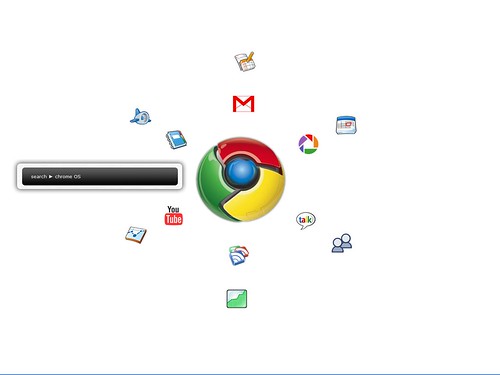
chrome os

Google has open source the source code of the Google Chrome OS published, (src.chromium.org). Google announced the availability of source code during a press conference at its headquarters in Mountain View.  The OS developer community can now, participate actively in developing the Chrome OS. One year from now the Google Chrome OS is expected to be available to the public. This operating system is going to be ready for netbooks..

Although the first devices with Google Chrome Operating System will be available and are fitted only in the fourth quarter of 2010 become, Google now publish the source code for technology partners, the open source community and outside developers the opportunity to contribute to the development of the operating system.

Google Chrome OS is designed to be lightweight and fast OS. This means that after starting your computer in seconds online should be. The operating system is based on Google Chrome. The browser was launched last year in response to a wave of powerful, new Internet applications. Google Google Chrome OS builds further on this vision through a fast, stable and secure Internet experience central to the operating system.

“In recent years the use of the Internet is becoming more intense and people there to do more complex tasks with increasingly demanding applications. We must therefore create a fundamentally different computing environment that meets the current requirements of the Internet,”

“With Google Chrome OS, we make electronic data processing faster, easier and safer than ever before. We still have a long way, but we inspire the progress that Google has already made”

The main Features of Google Chrome OS include:

Speed – Google Chrome to OS in a matter of few seconds to power up so quickly and so you can use online applications. During the press conference was a demonstration, currently launching Chrome OS takes about 7 seconds but this time Google is still trying to bring back.

Security – Because all the programs in Google Chrome OS running on the Internet, operates every tab in a separate security sandbox. This makes it harder for viruses and malware to infect computers;
Simplicity – Google Chrome OS introduces applications from the Internet entirely. This means that editing documents, creating PDF files, viewing pictures, etc. all on the Internet occurs, there shall be no locally stored data. Nothing needs to be downloaded and there is also no need to install updates to Internet to work and play. Updates to the operating system are installed automatically.

November 9, 2020 0 comment
0 FacebookTwitterPinterestEmail

Google Opensources Chrome OS for developers

by teamgpt November 9, 2020
written by teamgpt

chrome os
Google has open source the source code of the Google Chrome operating system published, (src.chromium.org). Google announced the availability of source code during a press conference at its headquarters in Mountain View.  The OS developer community can now, participate actively in developing the Chrome OS. One year from now the Google Chrome OS is expected to be available to the public. This operating system is going to be ready for notebooks..

The main Features of Google Chrome OS include:

Speed – Google Chrome to OS in a matter of few seconds to power up so quickly and so you can use online applications. During the press conference was a demonstration, currently launching Chrome OS takes about 7 seconds but this time Google is still trying to bring back.

Simplicity – Google Chrome OS introduces applications from the Internet entirely. This means that editing documents, creating PDF files, viewing pictures, etc. all on the Internet occurs, there shall be no locally stored data. Nothing needs to be downloaded and there is also no need to install updates to Internet to work and play. Updates to the operating system are installed automatically.

Security – Because all the programs in Google Chrome OS running on the Internet, operates every tab in a separate security sandbox. This makes it harder for viruses and malware to infect computers;

Google Chrome OS is designed to be lightweight and a fast OS. This means that after starting your computer in seconds you should be online. The operating system is based on Google Chrome. The browser was launched last year in response to a wave of powerful, new Internet applications. Google Chrome OS builds further on this vision through a fast, stable and secure Internet experience central to the operating system.

All that is stored in the system will be via flash drives. You do not have conventional disks, so you can think about high speed.

Don’t know what is Google Chrome OS? Watch a video:

November 9, 2020 1 comment
0 FacebookTwitterPinterestEmail
  • 1
  • …
  • 6
  • 7
  • 8
  • 9
  • 10
  • …
  • 90

About Me

Sr Developer

My name is Sharath, I'm a developer at heart ❤️ based in namma Bengaluru, India. Welcome to my internet journal where I discuss about Artificial Intelligence, Machine Learning, GPTs, Development and much more.

Keep in touch

Facebook Twitter

Resources

  • A Guide to Powerful Prompt Engineering. Mastering LLM Prompting

    March 20, 2025
  • How Masked Self-Attention Empowers Large Language Models?

    January 1, 2025
  • Guide To Building AI Agents with Llama 3.3 and Phi Data

    December 19, 2024

Recent Posts

  • A Guide to Powerful Prompt Engineering. Mastering LLM Prompting

    March 20, 2025
  • How Masked Self-Attention Empowers Large Language Models?

    January 1, 2025
  • Guide To Building AI Agents with Llama 3.3 and Phi Data

    December 19, 2024
  • Mastering ChatGPT with useGPT: Top 10 Trending Prompts For Everyday Tasks

    December 1, 2024
  • Strawberry: A Deep Dive into OpenAI’s Next-Gen AI Model

    September 11, 2024

Categories

  • Coding (12)
    • Backend (2)
    • Frontend (2)
    • Guide (2)
    • Machine Learning (8)
  • Data Science (5)
  • Guide (3)
  • News (37)
  • Resources (2)
  • SEO (1)

Backend

  • What does numpy seed function do?

    February 22, 2024
  • Getting Started with Backend Development 101

    January 25, 2024

Frontend

  • A Guide to Powerful Prompt Engineering. Mastering LLM Prompting

    March 20, 2025
  • How Masked Self-Attention Empowers Large Language Models?

    January 1, 2025
  • Guide To Building AI Agents with Llama 3.3 and Phi Data

    December 19, 2024
  • Mastering ChatGPT with useGPT: Top 10 Trending Prompts For Everyday Tasks

    December 1, 2024

Guide

  • Mastering ChatGPT with useGPT: Top 10 Trending Prompts For Everyday Tasks

    December 1, 2024
  • How To Nail Your Programming Interview

    January 25, 2024
  • Facebook
  • Twitter
  • Linkedin
  • Youtube
  • Email
  • Github
  • Stack-overflow

@2024 - All Right Reserved - usegpt.in