Use GPT
  • Home
  • Contact

Latest Video


Popular Posts

  • A Guide to Powerful Prompt Engineering. Mastering LLM Prompting

    March 20, 2025
  • Streamlined LLM Data Pipelines by Extracting & Serializing Text from Documents Of Various Formats

    May 31, 2024
  • 3

    Bring Large Language Models to Your Desktop (in 4 easy steps)

    May 5, 2024
@2024 - All Right Reserved - usegpt.in
Top Posts
A Guide to Powerful Prompt Engineering. Mastering LLM...
How Masked Self-Attention Empowers Large Language Models?
Guide To Building AI Agents with Llama 3.3...
Mastering ChatGPT with useGPT: Top 10 Trending Prompts...
Strawberry: A Deep Dive into OpenAI’s Next-Gen AI...
Streamlined LLM Data Pipelines by Extracting & Serializing...
Differences between Meta’s 3 8B-Instruct vs 8B model
Bring Large Language Models to Your Desktop (in...
Vlogger – Breathing Life Into Static Images through...
Top 5 Firefox Plugins to Power Up Your...

Google Acquires DocVerse

by teamgpt March 10, 2006
written by teamgpt

Yesterday, rumors spread that Google acquired PDF Reader – PDFMeNot is false news. But in the same day Google carried out a takeover of DocVerse created by 1 of the two former Microsoft employees.. Docverse is an real-time Office plug-in that allows you to work together within outlook.

docverse outlook plugin

DocVerse would be similar to Google Docs and Zoho. This web-based collaboration tools, with the world’s most powerful document processing procedures for most users to integrate Office can provide in the Office where the real-time sharing and editing functions, including Word, PowerPoint, and Excel documents. It is the biggest advantage is that you do not need to re-learn new ways of working exclusively as a seamless plug-in work in the Office Lane.

Although DocVerse do not use Google Docs as a real-time integration of the back support of the plugin.

Google says:

People are still accustomed to using desktop software, so this acquisition will help users in their favorite desktop software, where most familiar experience of cloud services.

Two former Microsoft employees wrote on the DocVerse official blog,:

We believed strongly that the world of productivity and collaboration was changing.  The world started moving toward easy-to-use web applications, like Google Docs & Apps, offering a new way to work with all kinds of benefits.   However, for the many people who use desktop software, like Microsoft Office, transitioning to the cloud was a challenge.   Unfortunately, today, individuals are still forced to make a choice between those two worlds.  Even worse, teams who use both products find that Office and web applications do not play well together; most times, teams choose one product or the other.  Google’s acquisition of DocVerse represents a first step to solve these problems.

Currently, you cannot create a new account, but you can still download their Office plug-in, and create an account for the first time use.

It looks like Google will hit most of the Microsoft foundations in 2010 – including, Microsoft Windows and Office packages.

Via Google Operating System

?

March 10, 2006 0 comment
0 FacebookTwitterPinterestEmail

Calling all Adsense Publishers for Haiti relief

by teamgpt February 10, 2006
written by teamgpt

Google is calling in all users of Google AdSense to donate a part of their income to Haiti. The money will be donated to the American aid organization and Partners in Health. This organization provides medical care in Haiti.

Google has a form online where you can turn a Google AdSense user to donate money, it is now available together with a number of conditions. Here you enter your AdSense login information such as your name and your ID Publiser and Amounts are in U.S. dollars that you wish to donate for the relief cause.

As you may expect, there are certain restrictions to donating, and all our normal policies still apply — so even if you’re donating, please don’t ask others to click on your ads in order to increase your earnings. For more information on how to participate, visit the Google Adsense donation form.

February 10, 2006 0 comment
0 FacebookTwitterPinterestEmail

Youtube is on IPV6

by teamgpt February 10, 2006
written by teamgpt

The breaking news is highly technical and relates to the servers of the platform – making official the rumors of recent days.

youtube

YouTube – which is one of the sites that generate more traffic from all over the web – for some time, “run” on IPv6: Google also incorporates in its official youtube blog, the statistics that give IPv4 addresses to expire – even though the switch protocol has been postponed the end of 2011.

Since the very first announcement of ipv6.google.com, Google has been committed to supporting IPv6 and have steadily added IPv6 support to more and more services. The service most requested to have IPv6 support has unquestionably been YouTube. Given all of this, we’re proud to make YouTube available over IPv6 and to begin streaming videos from a select number of sites worldwide to our Google over IPv6 partners. With YouTube on board, we now have a significant amount of content delivered on IPv6 and a real audience/traffic for it. This is a good day for YouTube, Google users and for an open and accessible Internet.

February 10, 2006 0 comment
0 FacebookTwitterPinterestEmail

Google launches multiple inboxes

by teamgpt February 9, 2006
written by teamgpt

Google added a new feature to Gmail Labs today: Multiple Inboxes. Created as a 20% time project by Google’s Octavian Costache, this new feature allows you to expand your standard Gmail inbox with additional panes. The name ‘Multiple Inboxes’ is misleading, however. In reality, this new feature gives you something akin to multi-pane viewing, with your main inbox on the left and up to five other ‘inboxes’ on the right. These additional inboxes can display anything from searches, to mail with a specific label or from a certain sender.

You can use any of the standard Gmail search functions like is:starred, label:abc, or has:attachment to define a new pane.

Showing the new panes on the right works best when you have a wide-screen monitor with a relatively high resolution. Otherwise, the additional ‘inboxes’ take up too much space and you won’t be able to read the subject lines of your incoming messages. If you add a lot of new inboxes, this will also make your screen look extremely cluttered.

google multiple pane inboxes

You can also chose to have Gmail display the extra inboxes underneath or above your standard inbox, though this method probably works best when you set Gmail to only show a small number of messages in your standard inbox.

This new feature will surely help those of us who get a lot of email to get a quicker overview of our incoming mail, but given the name, we had hoped that it would allow us to combine multiple Gmail accounts into one, which would be even more helpful for those of us who manage more than one email account through Gmail.

February 9, 2006 0 comment
0 FacebookTwitterPinterestEmail

Birth of the Social Web: Facebook Connect and Google Friend

by teamgpt December 8, 2005
written by teamgpt

December 4, 2008. Today may be remembered as the birth of the Social Web, as two major projects aimed at turning the Web social emerged from their restricted beta periods for general availability, Facebook Connect and Google Friend Connect. Together, these two major events sound the death knell for the walled garden phase of social networking. Early reactions to the news are quick to frame this as a head-to-head battle between Google and Facebook, but the truth requires a look at the details, and I think something much more profound is happening…

First, the similarities. Facebook Connect and Google Friend Connect share the same basic vision of the Social Web. Any site can become social, without having to build up its own social network. Users should be able to access those social features without having to experience the pain of usernames, passwords, uploading a photo, filling out a profile, importing an address book, and re-friending the people they’ve already connected with elsewhere. And, activity streams out to web-wide lifestream aggregators should become important engines of social discovery and growth for the site.

Now to the differences. One major difference between these two offerings is the technology under the hood. Google Friend Connect is built on the “open stack,” leveraging building blocks like OpenID, OAuth, and OpenSocial, whereas Facebook Connect is built on Facebook’s proprietary stack. A second difference is target market. Facebook has clearly focused on major sites, like Digg, Hulu, and CitySearch, and while simple implementations can be done with very little coding, most will involve a bit more complex development. Google, in contrast, has explicitly targeted the “long tail” of the web, sites that would never dream of writing their own social code; the focus of Google Friend Connect is to help these sites become social by cutting-and-pasting a few lines of javascript. The third major difference is one of strategy. Facebook Connect is all about making Facebook more useful to its users all over the Web. Google Friend Connect, on the other hand, is all about making the Web more social, with an approach that incorporates other social networks. For example, the current release integrates not only Orkut, but also Plaxo. (And recall that the earliest version also included Facebook, until Facebook shut that down.)

I’ve been playing around with Facebook Connect and Google Friend Connect all along the way while these services were being carefully tested and refined prior to today’s formal rollout. I like them both, but see lots of room for improvement. But that’s to be expected; this is a major shift in how the Web will work, and there’s a lot of complexity under the covers. Today marks the birth of the Social Web, and we should expect to see lots of rapid progress for this newborn.

December 8, 2005 0 comment
0 FacebookTwitterPinterestEmail

Google Dashboard: Your Google Data center

by teamgpt November 9, 2005
written by teamgpt

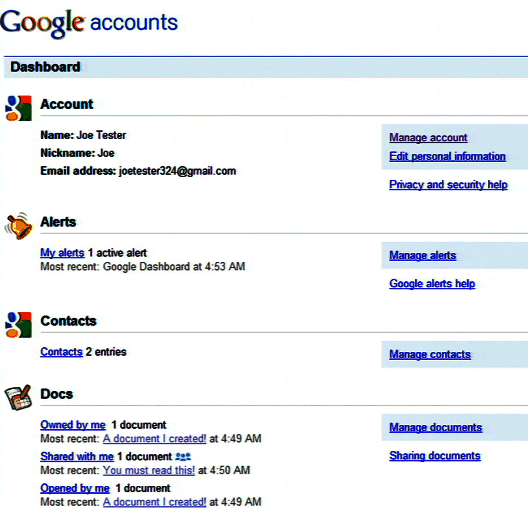
Google Dashboard is a new service that shows a summary of the data stored with a Google account. You’ll soon find a link to Google Dashboard in the “personal settings” of the “my account” page.
Google is coming with a new service called Google Dashboard which basically is a summary view of virtually all of your data that Google has saved, according to a video posted on the Google Privacy YouTube channel. When the video was given “embargoed until 2am PT, November 5th” and now the video is no longer available.

In the overview you see Google product information with links to any of the product that you currently have activated. If you want to see such information from Gmail. In the dashboard you can see the number of messages currently in your mailbox, the number of messages you have sent, chat history and the number of messages in the trash.
Lets see another example with YouTube: In summary your username, age, number of favorites, and playlists are also links to the specific settings of YouTube. Further on the Dashboard the number installed iGoogle gadgets, YouTube Data, Docs, Reader, Tasks etc are shown.
google settings
The Dashboard can be found by going after logging in with your Google Account such as Google.com on the top right, go to Settings and click on ‘Google Account Settings’. Under the heading “Personal Settings” there is an option to view this Dashboard, which brings you to a login page to verify your account.

Here is a screenshot of Google Dashboard from Google system blog:
google dashboard

Although this feature is not available for everyone yet!

November 9, 2005 0 comment
0 FacebookTwitterPinterestEmail

Google joins the Open Screen Project (Adobe’s Flash project)

by teamgpt October 9, 2005
written by teamgpt

adobe +Google

Google, has been working rather close with Adobe for years. Some of the most exciting projects such as YouTube, Android, Google Site Search, Google Chrome and even Google web search require close integration with Adobe’s technologies.

Along these lines, Google is excited to be joining Adobe’s Open Screen Project, an initiative established a year and a half ago to help developers more easily design content for the web across multiple screens using the Flash Platform.Google has always believed that open platforms lead to greater innovation on the web and we see participating in the Open Screen Project as another step in that direction.

Hope they two get to know each other well :)

October 9, 2005 0 comment
0 FacebookTwitterPinterestEmail

Google SketchUp Update

by teamgpt September 10, 2005
written by teamgpt

Google SketchUP the 3D modeling tool has a new version. This new version is the first – one of a kind, major update after 10years of its launch.

According to Google there are over 1 million people using sketchUp. “That’s a pretty humbling number for a a 3D model maker said product manager John Bacus of sketchup.

The latest version 8 includes new geo-modelling capabilities that use Google’s collection of geo-spatial data. According to Google it’s a fun, fast & easier way of making building models.

SketchUp 8 is available for download in English, French, Spanish, Italian & German languages respectively. The list of new features includes:

September 10, 2005 0 comment
0 FacebookTwitterPinterestEmail
  • 1
  • …
  • 72
  • 73
  • 74
  • 75
  • 76
  • …
  • 90

About Me

Sr Developer

My name is Sharath, I'm a developer at heart ❤️ based in namma Bengaluru, India. Welcome to my internet journal where I discuss about Artificial Intelligence, Machine Learning, GPTs, Development and much more.

Keep in touch

Facebook Twitter

Resources

  • A Guide to Powerful Prompt Engineering. Mastering LLM Prompting

    March 20, 2025
  • How Masked Self-Attention Empowers Large Language Models?

    January 1, 2025
  • Guide To Building AI Agents with Llama 3.3 and Phi Data

    December 19, 2024

Recent Posts

  • A Guide to Powerful Prompt Engineering. Mastering LLM Prompting

    March 20, 2025
  • How Masked Self-Attention Empowers Large Language Models?

    January 1, 2025
  • Guide To Building AI Agents with Llama 3.3 and Phi Data

    December 19, 2024
  • Mastering ChatGPT with useGPT: Top 10 Trending Prompts For Everyday Tasks

    December 1, 2024
  • Strawberry: A Deep Dive into OpenAI’s Next-Gen AI Model

    September 11, 2024

Categories

  • Coding (12)
    • Backend (2)
    • Frontend (2)
    • Guide (2)
    • Machine Learning (8)
  • Data Science (5)
  • Guide (3)
  • News (37)
  • Resources (2)
  • SEO (1)

Backend

  • What does numpy seed function do?

    February 22, 2024
  • Getting Started with Backend Development 101

    January 25, 2024

Frontend

  • A Guide to Powerful Prompt Engineering. Mastering LLM Prompting

    March 20, 2025
  • How Masked Self-Attention Empowers Large Language Models?

    January 1, 2025
  • Guide To Building AI Agents with Llama 3.3 and Phi Data

    December 19, 2024
  • Mastering ChatGPT with useGPT: Top 10 Trending Prompts For Everyday Tasks

    December 1, 2024

Guide

  • Mastering ChatGPT with useGPT: Top 10 Trending Prompts For Everyday Tasks

    December 1, 2024
  • How To Nail Your Programming Interview

    January 25, 2024
  • Facebook
  • Twitter
  • Linkedin
  • Youtube
  • Email
  • Github
  • Stack-overflow

@2024 - All Right Reserved - usegpt.in