Use GPT
  • Home
  • Contact

Latest Video


Popular Posts

  • A Guide to Powerful Prompt Engineering. Mastering LLM Prompting

    March 20, 2025
  • Streamlined LLM Data Pipelines by Extracting & Serializing Text from Documents Of Various Formats

    May 31, 2024
  • 3

    Bring Large Language Models to Your Desktop (in 4 easy steps)

    May 5, 2024
@2024 - All Right Reserved - usegpt.in
Top Posts
A Guide to Powerful Prompt Engineering. Mastering LLM...
How Masked Self-Attention Empowers Large Language Models?
Guide To Building AI Agents with Llama 3.3...
Mastering ChatGPT with useGPT: Top 10 Trending Prompts...
Strawberry: A Deep Dive into OpenAI’s Next-Gen AI...
Streamlined LLM Data Pipelines by Extracting & Serializing...
Differences between Meta’s 3 8B-Instruct vs 8B model
Bring Large Language Models to Your Desktop (in...
Vlogger – Breathing Life Into Static Images through...
Top 5 Firefox Plugins to Power Up Your...

iPad Sales Count in Real Time

by teamgpt April 10, 2008
written by teamgpt

Are you curious to find out how many iPad’s are sold since the launch – in real time? Chitika has posted a real-time tool to show the iPad sales count in real-time.

ipad sales in realtime by chitika

The figures are and estimate based on the number of iPad identified by the Chitika network. Also the Chitika labs page has the total location – “Adoption by state” statistics, of how many iPads are present in the US State and the % of iPads vs. population. Another interesting fact abt the report is the silicon valley – California has the highest number of % of iPads users.

If you want to view the real time stats visit the Chitika page for more information.

April 10, 2008 0 comment
0 FacebookTwitterPinterestEmail

Featured gadget: Resource Hog Tracker

by teamgpt April 9, 2008
written by teamgpt
google gadget

Name: Resource Hog Tracker

Author: Prithvi Prabhu

Description: Tracks processes that consume the most CPU cycles, memory and perform the most I/O operations on your computer.

More information | Download gadget

Each week Google gadget blog features a recently added Google Desktop gadget that looks promising. And I will get you all the scoop inside it!! :)…. Subscribe to RSS feed to get updates..

April 9, 2008 0 comment
0 FacebookTwitterPinterestEmail

Orkut also catches the election fever

by teamgpt April 9, 2008
written by teamgpt
Orkut

It’s election time in India, and the orkut team wants to make sure that your voice is heard this year. That’s why we’ve launched an ‘official’ community: “The Voice of Youth (www.orkut.co.in/loksabha2009).” By visiting the Voice of Youth community you can express your opinion and find out how other people from all over the country feel about the upcoming elections, the issues and India’s leaders.

We hope you take advantage of this new opportunity to be heard in this year’s election. Don’t delay though, as voting on all the polls will close on April 14th!

April 9, 2008 0 comment
0 FacebookTwitterPinterestEmail

New version of Gmail for iPhone & Android brings new features

by teamgpt April 9, 2008
written by teamgpt
GMailMobile

Google has the mobile version of Gmail revised. The new version for the iPhone and Android brings new features that are already out of the normal Gmail knows.

With checkboxes you can now mail in a more impetus to the archive and then the inbox, which, incidentally, has become faster, more speed.

The search is now up and thus easier to reach. In addition, the optics revised. The labels are now in the same colors as a normal computer background.

The new version is used by all supported versions of Android, the iPhone OS 2.2.1 must be installed if you would benefit from the features wish. Google “rolls” the update straight. In a few days should be enough for all his unlocked.

April 9, 2008 0 comment
0 FacebookTwitterPinterestEmail

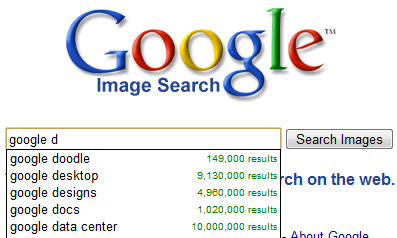
Google Suggest is now also available in the image search

by teamgpt April 9, 2008
written by teamgpt
Google suggest labs

Google Suggest feature is now integrated and available in the Image Search. Google Suggest provides search term suggestions when typing the word. Last week auto suggests was added to Google India search page also….

Who does not want Google suggestions, either can change the option in the settings or disable it by inserting & complete = 0 to the URL. Suggest is also available in India Image Search.

April 9, 2008 0 comment
0 FacebookTwitterPinterestEmail

Google News shows the number of sources covering a story

by teamgpt April 9, 2008
written by teamgpt
Google news

One of the strengths of Google News, is its not only that it has collected messages to present, but also to groups together. That works now so good that you are now familiar statistics on individual topics. In addition to a group of articles in the American version now even a chart with the frequency of the topic in recent days is shown.

Google News

In the right hand a side bar graph shows the number of sources about a specific topics which has been reported. Some stories can certainly be quite interesting and show how much of a story during the days in the heart of the event and also advised the media can. Unfortunately, still no specific date range from which one gets presents stories.

The whole thing works so far only in the American version, and apparently there is currently only in larger stories – not every issue has yet to provide this functionality. I am curious what kind of statistics and information, yet the news from their sources could be considered – I think there is still so much feasible.

Visit Google news now!

April 9, 2008 0 comment
0 FacebookTwitterPinterestEmail

Download Bulk photos from Facebook easily

by teamgpt March 10, 2008
written by teamgpt

facebook  photos

Sharing photos on social media is a common thing nowadays. But the only disadvantage of sharing photos on social media is easy access to download the photos from the sites unlike sharing via email or on photo sharing sites. Here is a new tool called PhotoGrabber that can be used to download bulk photos from Facebook..

download facebook photos in bulkThe usage of this software is very simple and anyone can use it. The first thing to do is to download the tool PhotoGrabber. The application is available for Windows and Mac OS X in a  .Zip format. After unzipping the folder, we must click to start and give permission to enter Facebook, and then provide the Facebook login information.

Thereafter PhotoGrabber offers a listing of all our contacts including ourselves to choose the pictures that we want to download. Then just choose the folder where you will be the tool we want to save the images and wait for them to download all. Depending on the connection and the number of snapshots take more or less.

You can repeat the process with photographs of friends or anyone. :) Share your comments below!

March 10, 2008 0 comment
0 FacebookTwitterPinterestEmail

Chrome Extensions to access Facebook and Orkut info with a click

by teamgpt March 10, 2008
written by teamgpt

Google Chrome 4 has two extensions very useful for all those social media addicts who start their day by accessing Orkut or Facebook like me.

orkut chrome and facebook

First is the Orkut Chrome Extension. It shows, all the new scraps, friend requests, group messages, and other types of alerts.

Second is the Facebook extension for Google Chrome. As before, it presents a small window of the browser and shows new messages from the social network.

Although,, in order for both the applications to work, you would need to login with your username and password for the sites and authenticate… Once that is done, the messages begin to appear in real time. This new chrome extension is worth the “effort” for three reasons:

-> The two extensions do not conflict with the performance of the browser,

-> Don’t have to signin to the websites in order to check updates all the time.

-> And finally, display updates in real-time.

If you are interested and want to try the new chrome extensions, you can download the Facebook Extension and Orkut extension from here. Do you use or know any other chrome extensions? share your comments below!

March 10, 2008 0 comment
0 FacebookTwitterPinterestEmail
  • 1
  • …
  • 63
  • 64
  • 65
  • 66
  • 67
  • …
  • 90

About Me

Sr Developer

My name is Sharath, I'm a developer at heart ❤️ based in namma Bengaluru, India. Welcome to my internet journal where I discuss about Artificial Intelligence, Machine Learning, GPTs, Development and much more.

Keep in touch

Facebook Twitter

Resources

  • A Guide to Powerful Prompt Engineering. Mastering LLM Prompting

    March 20, 2025
  • How Masked Self-Attention Empowers Large Language Models?

    January 1, 2025
  • Guide To Building AI Agents with Llama 3.3 and Phi Data

    December 19, 2024

Recent Posts

  • A Guide to Powerful Prompt Engineering. Mastering LLM Prompting

    March 20, 2025
  • How Masked Self-Attention Empowers Large Language Models?

    January 1, 2025
  • Guide To Building AI Agents with Llama 3.3 and Phi Data

    December 19, 2024
  • Mastering ChatGPT with useGPT: Top 10 Trending Prompts For Everyday Tasks

    December 1, 2024
  • Strawberry: A Deep Dive into OpenAI’s Next-Gen AI Model

    September 11, 2024

Categories

  • Coding (12)
    • Backend (2)
    • Frontend (2)
    • Guide (2)
    • Machine Learning (8)
  • Data Science (5)
  • Guide (3)
  • News (37)
  • Resources (2)
  • SEO (1)

Backend

  • What does numpy seed function do?

    February 22, 2024
  • Getting Started with Backend Development 101

    January 25, 2024

Frontend

  • A Guide to Powerful Prompt Engineering. Mastering LLM Prompting

    March 20, 2025
  • How Masked Self-Attention Empowers Large Language Models?

    January 1, 2025
  • Guide To Building AI Agents with Llama 3.3 and Phi Data

    December 19, 2024
  • Mastering ChatGPT with useGPT: Top 10 Trending Prompts For Everyday Tasks

    December 1, 2024

Guide

  • Mastering ChatGPT with useGPT: Top 10 Trending Prompts For Everyday Tasks

    December 1, 2024
  • How To Nail Your Programming Interview

    January 25, 2024
  • Facebook
  • Twitter
  • Linkedin
  • Youtube
  • Email
  • Github
  • Stack-overflow

@2024 - All Right Reserved - usegpt.in