



Does your girl friend lie to you that she’s on a business trip in London when she’s partying in LasVegas? :) Well now you can find out from which timezone the email is coming from!! Gotcha…. that’s the new feature in Gmail labs, where you can find the senders timezone :D
There’s a new feature in Gmail Labs called Sender Time Zone that can help. Turn it on from the Labs tab under Settings, and you’ll see green phone icons next to people who are probably awake and readily reachable (if it’s between 9:00 am and 6:00 pm in the sender’s local time zone) and red ones next to those who could be sleeping or out of the office:

Click “show details” and you can see when a message was sent in the sender’s time zone as well as what time it is for them now:

Message headers always include the time sent and often include time zone info too. We use that information to show you these icons.


So far, the only Google App Engine with Python programming. Now, Java is a programming language has been added. There will also be a language such as Groovy and JRuby support, based on the Java virtual machine from running.
In the first version of the API will be according to Google the key class libraries supported. In addition, there are the Java Servlet API, the JPA and JDO interfaces and javax.cache and javax.mail. Api Java runs in a sandbox.
Since it is because of the many Java applications will certainly be mistakes and omissions may occur compatibility, only the first 10,000 users to test admitted.

Google has made the search by color in the image search now officially available. Currently there are 12 different colors to choose from in the image search.

Unfortunately, the menu in Google Chrome 2 is not displayed…. So you can always try to get it to working by adding color=[color you want] in the Google search URL.. Or use the form from my previous post “Google image search becomes more intelligent” :) ….

Google search results will include Google profilesinformation too and now you could search for persons profile in the search results.
To give users greater control over what people find when they search for your name, Google has begun to show Google profile results at the bottom of U.S. name-query search pages. These results offer abbreviated information from user-created Google profiles and a link to the full profiles. Google has also added links so it’s easy to search for the same name on MySpace, Facebook, Classmates and LinkedIn.
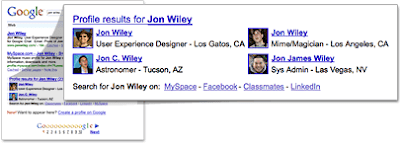
Don’t have a Google profile? Just search for [me] and follow the instructions at the top of the page to create one. In just a few minutes, you can create a public profile that represents you and that appears when people search for your name on Google. Check out www.google.com/profiles to learn more.

O3D is an open-source web API for creating rich, interactive 3D applications in the browser. This API is shared at an early stage as part of a conversation with the broader developer community about establishing an open web standard for 3D graphics.
The plugin is Google’s Windows, Linux and Mac. Google wants to develop but can not drive alone. Google is committed to the Khronos Group to participate and share a standard for 3D on the Internet develop.
The plugin also supports the Firefox, Chrome, Safari and Internet Explorer.

A serious vulnerability threat With the release of Google Chrome 1.0.154.59 patched in the latest security update.
When Google Chrome was installed and users on the Internet Explorer, a page has opened groomed, Google Chrome was launched and several tabs open. This download malicious code and the attacker gained control of the PC.
An error in handling URLs with a chromehtml: protocol could allow an attacker to run scripts of his choosing on any page or enumerate files on the local disk under certain conditions.
If a user has Google Chrome installed, visiting an attacker-controlled web page in Internet Explorer could have caused Google Chrome to launch, open multiple tabs, and load scripts that run after navigating to a URL of the attacker’s choice.
Microsoft will shortly begin a new microblogging service named Office Talk, which aims to employees to briefly share information, such as in Twitter.

As said in the Microsoft Office Labs blog, this concept will be to test the basic capabilities of microblogging in business environments, enabling employees to express their thoughts, activities and information that may be valuable for anyone who may be interested.
For the Redmond Company, OfficeTalk is not a product, but is a research project focused on where people can learn to use social networking tools at work and also know how companies and organizations can make use of this service.
Twitter is also hoping to be Twitter for businesses. And, for those who want something that runs on their own servers, there’s already Yammer, which has been around since 2008.
The challenge, says Office Labs general manager Chris Pratley, isn’t building a microblogging service. The features there are pretty basic and straightforward. The real issue, he said, is figuring out the necessary things to make it a service people want to use.