Use GPT
  • Home
  • Contact

Latest Video


Popular Posts

  • A Guide to Powerful Prompt Engineering. Mastering LLM Prompting

    March 20, 2025
  • Streamlined LLM Data Pipelines by Extracting & Serializing Text from Documents Of Various Formats

    May 31, 2024
  • 3

    Bring Large Language Models to Your Desktop (in 4 easy steps)

    May 5, 2024
@2024 - All Right Reserved - usegpt.in
Top Posts
A Guide to Powerful Prompt Engineering. Mastering LLM...
How Masked Self-Attention Empowers Large Language Models?
Guide To Building AI Agents with Llama 3.3...
Mastering ChatGPT with useGPT: Top 10 Trending Prompts...
Strawberry: A Deep Dive into OpenAI’s Next-Gen AI...
Streamlined LLM Data Pipelines by Extracting & Serializing...
Differences between Meta’s 3 8B-Instruct vs 8B model
Bring Large Language Models to Your Desktop (in...
Vlogger – Breathing Life Into Static Images through...
Top 5 Firefox Plugins to Power Up Your...

Youtube is now testing a new type of video player

by teamgpt October 9, 2012
written by teamgpt

youtube logo

Currently, YouTube is testing a new feature that allows you to find details about a video. In addition to the original resolution, bit rate and file size, the streaming speed, number of frames and some other info will be displayed. You can find all this When you right click on the video, and you would get an option to view the details of the video such as ‘Show video info’ and ‘copy debug info’..

youtube updates debug and show video info

It works for me but not for my friend, so I think this testing is only available for limited number of user’s. This announcement comes in from the Google OS blogspot.

October 9, 2012 0 comment
0 FacebookTwitterPinterestEmail

Google Squared: Its not that wonky now – Try it

by teamgpt October 9, 2012
written by teamgpt

Google announced a number of improvements to its pet project Google Squared which automatically extracts unstructured data from web pages and presents the search results as squares (like a spread sheet). Google says it will be particularly useful for research oriented questions where the answer is scattered through out the web and must be combined to bring out meaningful information.

Let try and test some of the improvements:

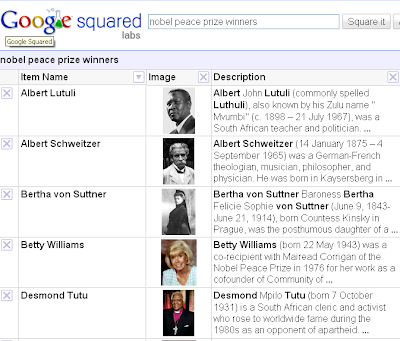
I really wanted to test if Google squared results shows recent results or boring old results, so I searched for ‘nobel peace prize winners‘ (after all the Obama news how can I forget). And for my surprise, the result didn’t include Barack Obama.

google squared results

I tried a couple of queries and observed that it really has some improved results after the recent updates. Though, it still has a long way to go before it can come out of labs.

New Things I noticed:

1. It now has the ability to sort by columns.
2. You can now export the Data from Squared to Google Spreadsheet or a CSV file.This certainly will be very useful (we could do this before too, but it wasn’t fitting in so well in the CSV).
3. The first search result could include up to 120 facts and upto 20 rows and 6 columns.

What is your opinion on Google Squared? post your comments below and let me know!

October 9, 2012 0 comment
0 FacebookTwitterPinterestEmail

Google, Microsoft both had talks with Twitter. Maybe a search deal coming soon?

by teamgpt October 9, 2012
written by teamgpt

Google and Microsoft were both in talks with Twitter. These negotiations were about an advanced stage where there would be to a license to tweets and to integrate search results on Google and Bing. This is interesting for both search engines because the messages posted on Twitter are often not so outdated and therefore highly topical results.

google bing yahoo and twitter

Twitter for that license would receive several million ($) and a share of the revenues of Google and Bing. Under the deal, the companies could license a full feed from Twitter which would then be integrated into the results of their competing search engines, a report on the Wall Street Journal´s technology blog said.. The deal is certainly not exclusive which means that other search engines can close off such an agreement.

{RUMOUR} Also, there is other news around Twitter. The micro-blogging service will soon be available in new languages, French, Italian, German and Spanish.

Twitter was founded in 2006 and currently has 54 million monthly users. I wonder what Yahoo is thinking!

Related: Bing leaks 1000’s of email addresses!

October 9, 2012 1 comment
0 FacebookTwitterPinterestEmail

Flickr from Yahoo, didn’t we know that already?

by teamgpt September 9, 2012
written by teamgpt

flickr from yahoo

Yahoo has a change to the logo of the online photo sharing service Flickr. The Flickr logo now has a new “from Yahoo!” in the home page and the search results page. It’s kinda weird why Yahoo suddenly sees the need to add its name to the Flickr logo.

September 9, 2012 1 comment
0 FacebookTwitterPinterestEmail

Nice Windows 7 Ad – Happy happy!

by teamgpt September 9, 2012
written by teamgpt

The kid in this video is soo cute :)

September 9, 2012 0 comment
0 FacebookTwitterPinterestEmail

Some useful Youtube tips and tricks

by teamgpt September 9, 2012
written by teamgpt
youtube

I watch lots of videos on Youtube :) so I’ve got some tricks of my own that I would like to share, which might be helpful while using Youtube. There are some tricks that you could do while loading a Youtube video.
Linking to point in video

You can easily create a link to a specific point in a YouTube video. To do this you add the time the video you want to start a link, eg # t = 45s.

E.g. A full link to a video in that case example: http://youtube.com/watch?WvJGfJQgk9kv=#t=45s. These are only the number of seconds, even minutes to add the feed: # t = 1m45s.
Start a video after certain time has elapsed

If you put a video on a website can only agree that a video is a certain time after a certain time. Thus it is useful if for example the first 15 seconds of a video can skip immediately. For embedded players is the possibility to make it start from a certain point. This is done by the embed code “& start = 15” add to the two URLs.
Upload videos via Mobile

One possibility is to quickly YouTube videos made with a mobile phone to upload the video website. To do this you own a secret email address where you send the video back then automatically appears on YouTube. You find your unique email address on the page: youtube.com / mobile.
Download your own video

Its possible to download the videos you’ve uploaded. You can do this by going to the page (http://youtube.com/my_videos) with the summary of your videos. And you would get an option to download as an MP4 download “for that specific video.
Popup videos

Videos can be opened in a separate popup so you can leave YouTube itself. A quick pop open a video using the right button.
Automatically start videos

An embedded player is when the page is opened automatically. When a visitor opens your website a video will start playing immediately. Just add ‘& autoplay = 1’ to the URLs in the embed code.
Add tags

Once your video is uploaded you can add some tags to the video to adjust to them more. A list of these tags can be viewed at: http:// google.com/support/youtube/bin/answer.py?Hl=en&answer=146,402 .

Disable Related Videos

In an embedded video at the end automatically related videos shows up in the video. These related videos are easy to disable through an addition to the two URLs in the embed code. To do this add “& rel = 0 ‘to the URL.

Create webcam movies

YouTube offers the ability to direct\make a video directly from the webcam (if you have one of course). It can quickly record a video and publish it online. Just go to on this page: http://youtube.com/my_webcam if you wanna give it a try.

Automatically loop a video again and again!

Videos are embedded on a website normally plays once and stops. By adding “& loop = 1” in the URL to the video, it automatically repeats.
Shop from Youtube

Recently, even YouTube merchandise. The Google Store (googlestore.com / youtube.asp) you shirts, caps, socks, pens, notebooks and buying bibs that have a YouTube logo.

ps. Youtube is also planning on making money from paid previews for the new movies.
YouTube Channels
Once you have a YouTube account and videos you have uploaded your own YouTube channel automatically. This is reached by going to YouTube.com / user surfing event to meet then you can design.

Tips while embedding Youtube videos on your site!

Automatic HD

Videos in HD may thereby be positioned on a standard website which is not the case. To embed a video that plays in HD click the embed code on the video page on YouTube under the options, select “Play in HD ‘to. This post can also be activated by “& cf = 1” to add the two URLs.
Hide Title on the Youtube video

Once a video is embedded, the title of the video is automatically displayed in the top left image. This title is also a code to hide by adding the two URLs in the embed code of a video. Then add “= 0 & show info” to the URLs for the title of one video standard to hide.

Hide Notes

As a user of YouTube videos with you own notes. If you have a video of yourself or someone else will embed in the notes is not possible for these notes to show. This add a new code to the two URLs in the embed code. To do this add “& iv_load_policy = 3 ‘to.
Play YouTube on your TV

There is a specially optimized version of YouTube for example a With a Sony Playstation or a PC with Media Center. An overview of the features you find on the page: youtube.com / youtubeonyourtv.

Full Screen button to delete

In the embed code of a video is the standard entry ‘& fs = 1 “included in the two URLs. By making the change from 1 to 0, it would remove the full screen button from the player.

Change colors in the embedded Youtube player

Standard if you will post a video on a website has the standard colors. The URLs in the embed code are two color particulars of which 1 is the background color and the other the border color, these are color1 and color2, both come twice. By now own values (0x back) to introduce you the color (HEX-codes) to desire change. For example color2 = 0xb1b1b1 becomes color2 = 0xFF6600 which means amber. So give the players than their own colors.

Download YouTube videos..
Download Videos from Youtube

Finally, it is possible to download videos from YouTube:

1. First is the Website mediaconverter.org. On the website you can link to a video input and you have the opportunity to watch the video in various formats to download. There is also a search function available to search for videos on YouTube to download. Media Converter is free to use.

2. Another useful website to download videos from YouTube is keepvid.com. On the website you enter the URL of a video and then a number of download links are available on the download page. You can right-click and selecting “Save target as” / “Save link as” to download.

Happy Youtubing! :)

September 9, 2012 0 comment
0 FacebookTwitterPinterestEmail

Google Doodle – Confucius’s Birthday, China

by teamgpt September 9, 2012
written by teamgpt
Confucius's Birthday doodle

Confucius, lit. “Master Kong,” (traditionally September 28, 551 B.C.E. – 479 B.C.E.) was a Chinese thinker and social philosopher, whose teachings and philosophy have deeply influenced Chinese, Korean, Japanese and Vietnamese thought and life.

Want to see more Google Doodle?

September 9, 2012 0 comment
0 FacebookTwitterPinterestEmail

Coming soon: Google’s Fast and improved real time search

by teamgpt August 9, 2012
written by teamgpt
google logo

Google to launch its new realtime search. This search is more faster and seems more capable of producing real-time results. Although its way too early to make any definitive conclusions about this new search, but we will test it out thoroughly and give you a full report soon. Interested? try it out for yourself and tell us what you think.

It was announced through the Google Webmasters blog.

August 9, 2012 0 comment
0 FacebookTwitterPinterestEmail
  • 1
  • …
  • 31
  • 32
  • 33
  • 34
  • 35
  • …
  • 90

About Me

Sr Developer

My name is Sharath, I'm a developer at heart ❤️ based in namma Bengaluru, India. Welcome to my internet journal where I discuss about Artificial Intelligence, Machine Learning, GPTs, Development and much more.

Keep in touch

Facebook Twitter

Resources

  • A Guide to Powerful Prompt Engineering. Mastering LLM Prompting

    March 20, 2025
  • How Masked Self-Attention Empowers Large Language Models?

    January 1, 2025
  • Guide To Building AI Agents with Llama 3.3 and Phi Data

    December 19, 2024

Recent Posts

  • A Guide to Powerful Prompt Engineering. Mastering LLM Prompting

    March 20, 2025
  • How Masked Self-Attention Empowers Large Language Models?

    January 1, 2025
  • Guide To Building AI Agents with Llama 3.3 and Phi Data

    December 19, 2024
  • Mastering ChatGPT with useGPT: Top 10 Trending Prompts For Everyday Tasks

    December 1, 2024
  • Strawberry: A Deep Dive into OpenAI’s Next-Gen AI Model

    September 11, 2024

Categories

  • Coding (12)
    • Backend (2)
    • Frontend (2)
    • Guide (2)
    • Machine Learning (8)
  • Data Science (5)
  • Guide (3)
  • News (37)
  • Resources (2)
  • SEO (1)

Backend

  • What does numpy seed function do?

    February 22, 2024
  • Getting Started with Backend Development 101

    January 25, 2024

Frontend

  • A Guide to Powerful Prompt Engineering. Mastering LLM Prompting

    March 20, 2025
  • How Masked Self-Attention Empowers Large Language Models?

    January 1, 2025
  • Guide To Building AI Agents with Llama 3.3 and Phi Data

    December 19, 2024
  • Mastering ChatGPT with useGPT: Top 10 Trending Prompts For Everyday Tasks

    December 1, 2024

Guide

  • Mastering ChatGPT with useGPT: Top 10 Trending Prompts For Everyday Tasks

    December 1, 2024
  • How To Nail Your Programming Interview

    January 25, 2024
  • Facebook
  • Twitter
  • Linkedin
  • Youtube
  • Email
  • Github
  • Stack-overflow

@2024 - All Right Reserved - usegpt.in