
Use GPT
  • Home
  • Contact

Latest Video


Popular Posts

  • A Guide to Powerful Prompt Engineering. Mastering LLM Prompting

    March 20, 2025
  • Streamlined LLM Data Pipelines by Extracting & Serializing Text from Documents Of Various Formats

    May 31, 2024
  • 3

    Bring Large Language Models to Your Desktop (in 4 easy steps)

    May 5, 2024
@2024 - All Right Reserved - usegpt.in
Top Posts
A Guide to Powerful Prompt Engineering. Mastering LLM...
How Masked Self-Attention Empowers Large Language Models?
Guide To Building AI Agents with Llama 3.3...
Mastering ChatGPT with useGPT: Top 10 Trending Prompts...
Strawberry: A Deep Dive into OpenAI’s Next-Gen AI...
Streamlined LLM Data Pipelines by Extracting & Serializing...
Differences between Meta’s 3 8B-Instruct vs 8B model
Bring Large Language Models to Your Desktop (in...
Vlogger – Breathing Life Into Static Images through...
Top 5 Firefox Plugins to Power Up Your...

Google publishes Voice Application for Android and BlackBerry

by teamgpt July 9, 2018
written by teamgpt

Voice+Mobile

Google has launched a new application for Android and BlackBerry phones with Google Voice application you can make voice calls from the mobile phone itself.

Here is what it say on the product page about this new feature of the Google application.  You can:

– SMS messages and make calls with any of the active Google Voice numbers

– Spare cash on international calls

– Voice mails and read transcriptions

– Manage Inbox and callers list

July 9, 2018 0 comment
0 FacebookTwitterPinterestEmail

Facebook saves your imported contacts data but do you know how to remove it? And complications involved

by teamgpt July 9, 2018
written by teamgpt

facebook

When you import your address books to invite people to Facebook using the Friend Finder, it claims not to save the password but what about the contacts?

facebook friend finder privacy

According to the privacy “Facebook will not save your password” but wait, what is learn more here? When I clicked on it, it says:

facebook friendfinder saves contacts

“We may use the email addresses you upload through this importer to help you connect with friends, including using this information to generate Suggestions for you and your contacts on Facebook.”

But what if Facebook had used my friends’ imported contact lists to suggest their profile to me even though they didn’t add me as a friend while importing contacts? Even if you choose to skip the contacts you have imported them and Facebook will still store your relationship with those contacts. Not only will it continue to include them in your suggestions, but it will also alert them to the fact that you previously imported their email address and that you are registered on Facebook. Admittedly, your account will only be suggested to others if your privacy settings allow your profile to be searchable…

So, if you don’t know what to do and how to remove the imported contacts from Facebook, visit Remove Contacts Imported using the Friend Finder and click on remove…Friends’ contact information is valuable data, so don’t let them in the open… In my opinion, Facebook should put this information on the first page that you get when importing contacts, rather than hiding the info under a small light box !!!!!

Liked this post? get FREE updates via RSS or email, or follow me on Twitter. :)

July 9, 2018 0 comment
0 FacebookTwitterPinterestEmail

How to Succeed with a Blog? Learn from XKCD

by teamgpt May 10, 2018
written by teamgpt

Observations are having a good relationship with your readers is amazing. Having good content is amazing.

> For humans, content is  boring than good content.

> For Google, the relationship with your readers is all that matters (your popularity -> links).

So I think, that’s the reason why XKCD is popular today :

blogging tips from xkcd

– The key to a successful blog is to create a relationship with your readers.
– I thought it was “do your updates so good that people want to read them.”
– I will discuss the generation of content on the third.
– Cool! I love the content.

May 10, 2018 0 comment
0 FacebookTwitterPinterestEmail

IPL-2 is here! And its all about competition,victory, Glamour and Glitz

by teamgpt April 9, 2018
written by teamgpt

ipl teams

Indian Premier League (IPL) is here! YAY…. IPL begins today in South Africa! Wanna checkout the schedule for the IPL matches?? Click here…

Good thing about IPL is you can watch all the beautiful people from India, Shah Rukh Khan, Preity Zinta, Shilpa Shetty, Lalit Modi and, of course, Katrina kaif are all here and they have ensured that the glitz and glamour that propelled the IPL into prominence remains untouched even outside India… :D

I thought it would be good to share some of the IPL songs of 2009 here… here you go, watch all the IPL songs, they’re really good :D trust me… with preity zinta, shilpa shetty, Katrina kaif etc… its gonna be huge :)

Checkout which actors\actress supports which IPL team:

  • Bangalore Royal Challengers – Vijay Mallya
  • Mumbai Indians – Kareena kapoor, Saif Ali Khan, Anil Kapoor, Hrithik Roshan
  • Kings XI Punjab – Priety Zinta, Ness Wadia
  • Chennai Super Kings – Vijay
  • Deccan Chargers – Sameera Reddy, Hansika
  • Rajasthan Royals – Shilpa Shetty, Raj Kundra
  • Kolkata Knight Riders – ShahRukh Khan, Vivek Oberoi,
  • Delhi Daredevils – Akshay Kumar,

I’ve posted some Song promotional videos of all the IPL teams… watch and enjoy!

Bangalore royal challengers – Katrina kaif


Mumbai Indians – Hrithik roshan


Punjab Super Kings XI – Priety zinta


Chennai super kings – Vijay


Knight riders – Shahrukh khan


Deccan chargers


Rajasthan Royals – Shilpa Shetty


Delhi Daredevils

If you like this post, subscribe to mYpassion RSS feed, to get more and fast updates ….


April 9, 2018 0 comment
0 FacebookTwitterPinterestEmail

Google latitude goes orkutting – find where your friends are now!

by teamgpt April 9, 2018
written by teamgpt

Google latitude

The recent launch of Google Latitude, is a fun new way to share your live location with friends. For those of you who aren’t familiar, Google Latitude is a feature of Google Maps for Mobile that lets you (if you choose to opt-in) share your whereabouts and receive updates about your friends’ approximate locations.

While Google has already launched an iGoogle gadget, we all know that Googles launch couldn’t be complete without bringing this to orkut. That’s why a group of the Google Mobile team has created a Google Latitude application.

With this app, you can share your location and see your friends’ locations on a map inside of orkut. Notice that an old friend is back in your hometown? Just click on her photo and send a scrap or head to her profile page and see what she’s up to.

If you use Google Latitude from your mobile phone, you can even send your friends updates on your location while you’re out and about, making it easier to bump into the people you care about.

Excited? Add the app and let your friends know where you are – live!!!!

April 9, 2018 0 comment
0 FacebookTwitterPinterestEmail

Gmail Labs: More beneficiaries propose, suggest more recipents!

by teamgpt April 9, 2018
written by teamgpt

Gmail Labs

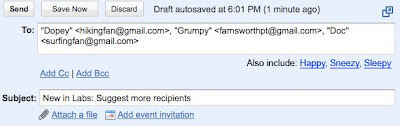
The new published “Suggest more recipients” will be helpful when writing emails . It proposes to the input of at least two other contacts.

Who proposed, based on past conversations with several contacts. If one writes, for example, his mother, his father and his siblings almost always all the same mail will appear the names of the siblings after the mother and the father were added as recipients.

(Source: GWB – thanx)

April 9, 2018 0 comment
0 FacebookTwitterPinterestEmail

YouTube tests new design in the Channels….. Ssh! its a secret

by teamgpt April 9, 2018
written by teamgpt

youtube

The settings are displayed in three tabs, which increase the clarity of the Youtube profile page. Currently there are 10 different themes, yet each one individually – for example through a different link color can adapt for anyone who wants can add more.

The design can also continue with a background image to be. What elements should be displayed, you can continue to lay down. You can also specify which playlists are displayed and many friends are displayed. This also applies to subscribers and subscriptions.

A profile can define which information such as last login, video or website Reputable public. In the settings it is important to note that the details are online, not with a check mark. If you do not like the design, click on “Revert! I want my old back channel” to disable the new design. Your channel will appear again in the old design.

youtube channels 2.0 beta

Wanna see how it looks?? Checkout my Youtube channel over here ……
Why is there a new versions of channels in the first place? Well, here are a few reasons:

  • A better channel experience for your visitors – folks can browse through and watch your uploads, favorites, and playlists without needing to leave your channel
  • Help you enrich your channel – we’ll help you customize and design your channel (and the videos on it) without ever leaving the page – and we’ll give you some default themes to start with
  • A design refresh – yes, our corners are now rounded in many browsers, saving valuable pixels

So…how do things look so far? What do you like the most, and what do you wish was different? Let us know in the comments.

Enjoy the beta!

If you also want to Opt into the seekrit YouTube beta testing… go here

April 9, 2018 0 comment
0 FacebookTwitterPinterestEmail

How to Earn More Farmville Cash than Coins?

by teamgpt March 10, 2018
written by teamgpt

I’ve written so many farmville cheats, hacks or how to simply download the farmville bot, it just doesn’t stop there, i’ve got more. Tired of just making Farmville coins? Here is a quick way to make more Farmville cash.

* Get more ribbons: every time you achieve a ribbon, you automatically receive 1 more free cash buck.

* Level up: For every level you achieve you get free farmville cash.

* Buy more items: Although the game is free to play, the company would like people to buy farm dollars with real money to buy specialized items, so that they can use the real money to help offset the expenses of running the game servers. So you can buy farm cash with real American money (usd). you must pay zynga by credit card online, by  clicking the “+ add coins and cash” link at the top-left of the page.

* Complete free offers: The best ones are the ones saying “reach final steps.” just go through it all as fast as you can, putting in false information so you don’t  get spammed (most importantly: put in a fake email address – If you don’t want to be spammed). Once you reach the final steps page, take a screenshot (alt + printscreen/sysrq) and close the browser. You should get your farmville cash within a minute (you’ll get however many it offered). If you don’t receive it, go back onto the missing farm cash area and click on the customer support. Type in your question of “where is my farm cash etc.” and post a link to your screenshot taken earlier. Wait approximately 1-3 hours and you will have your farmville cash, along with an email of apology from the support for your troubles.

Well, these are some of the best tricks that I use on Farmville and I’ve got about 200 farm cash from doing this offer as there is no limit – so just try them all and let me know :)…

March 10, 2018 0 comment
0 FacebookTwitterPinterestEmail
  • 1
  • …
  • 13
  • 14
  • 15
  • 16
  • 17
  • …
  • 90

About Me

Sr Developer

My name is Sharath, I'm a developer at heart ❤️ based in namma Bengaluru, India. Welcome to my internet journal where I discuss about Artificial Intelligence, Machine Learning, GPTs, Development and much more.

Keep in touch

Facebook Twitter

Resources

  • A Guide to Powerful Prompt Engineering. Mastering LLM Prompting

    March 20, 2025
  • How Masked Self-Attention Empowers Large Language Models?

    January 1, 2025
  • Guide To Building AI Agents with Llama 3.3 and Phi Data

    December 19, 2024

Recent Posts

  • A Guide to Powerful Prompt Engineering. Mastering LLM Prompting

    March 20, 2025
  • How Masked Self-Attention Empowers Large Language Models?

    January 1, 2025
  • Guide To Building AI Agents with Llama 3.3 and Phi Data

    December 19, 2024
  • Mastering ChatGPT with useGPT: Top 10 Trending Prompts For Everyday Tasks

    December 1, 2024
  • Strawberry: A Deep Dive into OpenAI’s Next-Gen AI Model

    September 11, 2024

Categories

  • Coding (12)
    • Backend (2)
    • Frontend (2)
    • Guide (2)
    • Machine Learning (8)
  • Data Science (5)
  • Guide (3)
  • News (37)
  • Resources (2)
  • SEO (1)

Backend

  • What does numpy seed function do?

    February 22, 2024
  • Getting Started with Backend Development 101

    January 25, 2024

Frontend

  • A Guide to Powerful Prompt Engineering. Mastering LLM Prompting

    March 20, 2025
  • How Masked Self-Attention Empowers Large Language Models?

    January 1, 2025
  • Guide To Building AI Agents with Llama 3.3 and Phi Data

    December 19, 2024
  • Mastering ChatGPT with useGPT: Top 10 Trending Prompts For Everyday Tasks

    December 1, 2024

Guide

  • Mastering ChatGPT with useGPT: Top 10 Trending Prompts For Everyday Tasks

    December 1, 2024
  • How To Nail Your Programming Interview

    January 25, 2024
  • Facebook
  • Twitter
  • Linkedin
  • Youtube
  • Email
  • Github
  • Stack-overflow

@2024 - All Right Reserved - usegpt.in